
Amazon Kindle 2 is undoubtedly the most favorite eBook reader and if you are looking for its Shortcut Keys / Hotkeys for Kindle 2, then here are some.
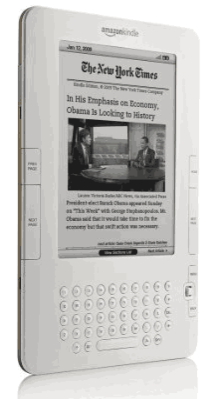
This year we have witnessed some outstanding ebook readers, but Kindle 2 have undoubtedly proven its metal in heavy competition. Below are the Shortcut Keys / Hotkeys for Kindle 2:
| Shortcut Key | Result |
| Alt + B | Bookmark |
| Alt + T | Spell out time |
| Alt + Next Page | Jump ahead by 5% |
| Alt + Prev Page | Jump back by 5% |
| Alt + T | Show time |
| Number keys | Jump to corresponding page in the Home Menu |
| Alphabet keys | Jump to corresponding page from alpha-sorted Home Menu |
| J | Show/hide justification options |
| Alt + Home | Go to Amazon Kindle Store |
| @store | Store search shortcut |
| @web | Web search shortcut (Google) |
| @wiki | Wikipedia search shortcut |
| @time | Show current date and time |
| @author[author’s name] | Search Content by Specific Author |
| Alt + G | Refreshes the screen |
| Up Arrow + SYM button | Turns on/off Text To Speech. |
| Alt+shift+G | Creates A Screenshot |
| Alt+shift+1-9 | Changes the spacing and number of lines per page |
| ALT + Space | Play or stop background audio |
| Press MENU button | Display the time |
| Press MENU button | Display free memory |
| Press MENU button | Display wireless network (3G or 1X, if wireless is on) |
| Shift+ALT+M | Play Minesweeper (from home page) |
| Slide and release the power button | Put Kindle to sleep or wake it up |
| Slide and hold the power button for 4 seconds | Power off |
| Slide and hold the power button for 15 seconds | Reset |
| From Settings Menu, Enter 411 | Show Diagnostic Data |
| Alt + F | Next song |
| ALT+spacebar | Play or stop MP3 Audio |
| Spacebar | Pause Audible Audiobook |
|
In the Picture Viewer: F Q W R E Pan Photo Larger Than Screen |
Toggle Actual Size Toggle Full Screen Zoom In Zoom Out Rotate reset zoom level Use 5-way controller to pan photo |
| Alt + 1 | Show Current Location in Google Maps |
| Alt + 2 | Find Gas Station Nearby |
| Alt + 3 | Find Restaurant Nearby |
| Alt + 5 | Find custom keyword nearby |
| Alt + D | Dump debug info to the log and toggle highlight default item |
| Alt + Z | Toggle zone drawing and shoe log |
These are some of the Shortcut Keys / Hotkeys for Kindle 2 which will let you use your ebook reader with extreme ease and fun. Try them and share if I have missed any of the shortcut keys.
also, alt+ f changes the audio track