
Here are the steps to fix / repair NSIS Error on your computer. Why does NSIS Error occur? It actually occurs during any software installation. During that process, this NSIS error occurs whenever the integrity check fails.
And when this error occurs, the installation process gets corrupted. Below are the steps:
Step 1: Click on Start button and then click on Run button. Here, type cmd to laund the command prompt.
Step 2: This will open a BLANK WINDOW. All you need to do is simply drag and drop the installation file on this blank window. So regardless the size or any other factor of the installation file (.exe), simply drag it and drop it. This will show the complete path of the installation file on the screen.
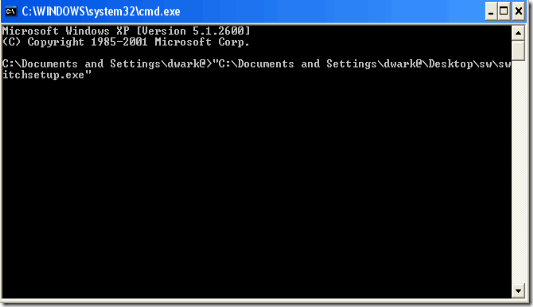
Step 3: Now,there add a space and type /NCRC. For example, C:\reviewunit\installationfile-setup.exe /NCRC.
Step 4: Now press Enter key. This will now start the installatio prcoess and will not prompt any NSIS error.
I have no idea what it means, “the installer” I purgcahsed an older model pc a COMPAQ. From Heartland.I HAVE NOT INSTALLED ANY THING MORE TO THE SYSTEM.
You got very interesting debate started on your website and its worth a lot of comments. Very less people are able to talk so well about this topic. A big thumbs up from me.
THANKS
It’s working trick indeed. I downloaded the Android SDK file so many times but got the NSIS error again and again. I applied your trick and it really worked.
Thanks for a great tutorial !
the unfortunate thing is that you comp nerds…and I really do love you guys..you assume that I can find what you are telling me to find. I am a self proclaimed comp idiot. as soon as I learn one thing someone changes it. I had to buy a new comp last march…just when I was getting used to VISTA!!! Anyway… thanks. I just needed to vent . Maybe someday that little nsis screen and I will be friends.
This did NOTHING for me. Am I doing something wrong? I type in everything correctly, and it still wont work.